
How to make your website
readable for AI agents
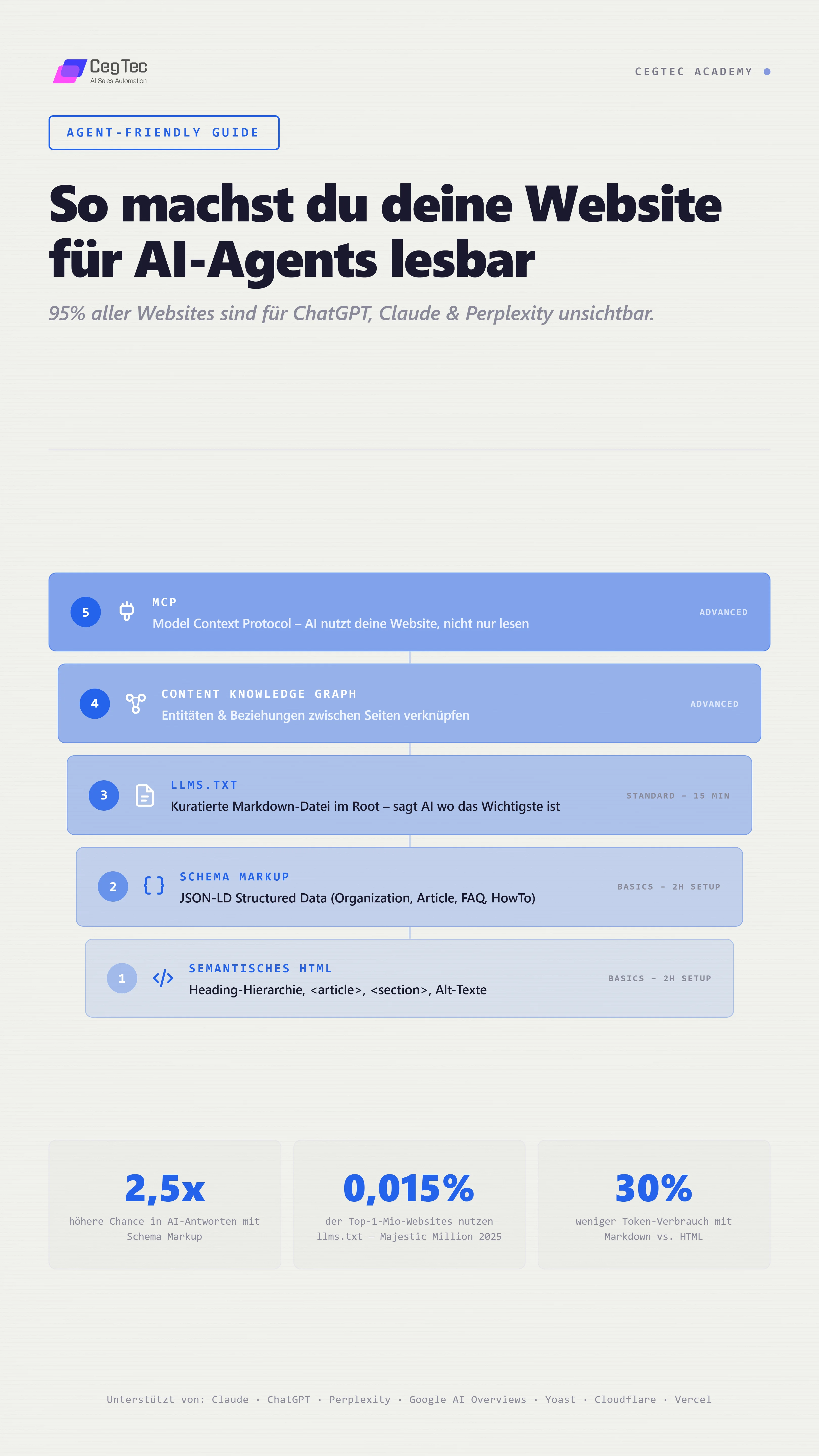
95% of all websites are invisible to ChatGPT, Claude and Perplexity.
This guide shows you how to change that in 2 hours.
Everything you need: semantic HTML, schema markup, llms.txt, and optionally MCP. No developer required.
Your website doesn't exist for AI, because AI cannot read it.
AI agents like ChatGPT, Claude, Perplexity and Google AI Overviews are becoming the primary information source for B2B research. When a buyer asks "Which companies offer X in my region?", it's no longer Google answering with 10 blue links. It's an AI agent answering with a concrete recommendation.
The problem: these agents read websites fundamentally differently from humans or classic Google crawlers. At inference time they only fetch the information they currently need. If your most important pages are not clearly prioritised and structured, they get skipped, no matter how good your content is.
HTML parsing is inefficient for AI. Token economics decide what gets read: HTML uses significantly more tokens than markdown. JS-heavy websites with client-side rendering are completely invisible to many agents because they cannot run JavaScript.
The result: your competitors get cited, you don't. Not because your offering is worse, but because AI cannot read your website.
The good news: you can change this in 2 hours.
5 levels to an agent-friendly website.
From basics to advanced.
Each level builds on the previous one. The first three are doable in an afternoon, no developer needed.
The 5 levels in detail
Below we walk through each level in detail, with concrete examples, code snippets and the results you can expect.
Semantic HTML, the foundation almost everyone gets wrong
Before you think about llms.txt and schema, your HTML has to be clean. AI agents parse HTML hierarchically. If your headings, lists and sections don't make sense, no schema will save you.
The most important rules:
- Heading hierarchy: H1 then H2 then H3, never H1 then H3 then H2. AI uses headings to prioritise content.
- Semantic tags: <article>, <section>, <nav>, <aside>, <main> instead of div soup. These tags give AI context about the function of each area.
- Alt text on every image, AI reads it and uses it as a context signal.
- Meta descriptions written for AI, not just for Google snippets. Answer the question: "What does this page offer?"
- Clean URLs with descriptive paths (e.g. /services/outreach instead of /page?id=123).
- Internal linking as a context signal, it shows AI which pages belong together.
❌ Bad:
<div class="title">Our Services</div>
<div class="text">We offer outreach...</div>

✅ Good:
<section>
  <h2>Our Services</h2>
  <article>
    <h3>Precision Outreach</h3>
    <p>Signal-based lead generation...</p>
  </article>
</section>Schema markup, the language AI understands
Schema markup (structured data) is the most important technical foundation for AI to understand, verify and cite your content. JSON-LD is the preferred format, recommended by Google and favoured by all AI engines.
The 6 most important schema types for B2B:
Who are you? Name, logo, contact, social profiles
Blog posts, guides, case studies
Frequently asked questions, AI agents love FAQ schemas
Step-by-step instructions
What do you offer? Pricing, features
Page structure for navigation
{
  "@context": "https://schema.org",
  "@type": "Organization",
  "name": "Your Company GmbH",
  "url": "https://yourcompany.com",
  "logo": "https://yourcompany.com/logo.png",
  "description": "Short description of your company",
  "address": {
    "@type": "PostalAddress",
    "addressLocality": "Munich",
    "addressCountry": "DE"
  },
  "contactPoint": {
    "@type": "ContactPoint",
    "email": "info@yourcompany.com"
  }
}Validation:
Test your schema with the Google Rich Results Test (search.google.com/test/rich-results) and the Schema.org Validator. Both are free and tell you instantly whether your markup is correct.
AI sees: HTML soup, has to guess what the company does, where it's based and what it offers.
AI sees: structured facts, name, services, location, contact, and can cite them directly.
llms.txt, the robots.txt for AI
llms.txt is a new standard (since 2024, proposed by Jeremy Howard / Answer.AI) that tells AI agents: "Here's the most important content on my website." A curated markdown file in the root of your domain.
The idea: instead of AI having to crawl and filter your entire site, you give it a structured overview, in markdown, the format AI processes most efficiently.
llms.txt vs. llms-full.txt: the base file (llms.txt) contains an overview with links. The optional llms-full.txt contains the full content of your most important pages as markdown, for AI agents that want to process everything in one go.
Current state: Claude supports it officially, Yoast has built in auto-generation, Cloudflare/Vercel/Netlify have published guides. Not yet an official IETF/W3C standard, adoption below 0.005% of websites. Early adoption equals competitive advantage.
# Your Company GmbH

> Short description: what does your company do,
> for whom, and what is the core value?

## Services
- [Outreach Engine](https://yourcompany.com/services/outreach):
  Signal-based B2B lead generation
- [AI Visibility](https://yourcompany.com/services/visibility):
  SEO + GEO for AI search engines

## Resources
- [Blog](https://yourcompany.com/blog):
  Insights on B2B sales & AI
- [Case Studies](https://yourcompany.com/case-studies):
  Results for clients

## Contact
- [Book an intro call](https://yourcompany.com/contact)
- Email: info@yourcompany.comDifference from robots.txt and sitemap.xml:
Content knowledge graph, link pages intelligently
Schema markup on individual pages is good. Schema that connects pages to each other (knowledge graph) is better. AI agents trust websites more when they explicitly define entities and relationships.
Entity-based SEO: instead of optimising individual keywords, you define entities (your company, your services, your team) and their relationships. AI understands: "CegTec offers outreach, is based in Bavaria, Julian Ceglie is the founder", not as isolated data points but as linked knowledge.
How pages reinforce each other:
- About page: Organization schema, references the team page (Person schema)
- Team page: Person schema, references articles they wrote
- Service pages: Service schema, references case studies as proof
- Blog posts: Article schema, references services and team as authors
NLWeb: Microsoft launched an initiative in 2025 for conversational websites, based entirely on Schema.org. That confirms: investing in schema today prepares you for the next generation of the web.
MCP, Model Context Protocol
llms.txt and schema help AI read your website. MCP lets AI interact with your website, query data, trigger actions, use tools.
Model Context Protocol (MCP) is an open standard from Anthropic that connects AI agents directly to data sources and services. Instead of an agent crawling your site, it can query specific information through MCP, in real time, structured, efficient.
The difference:
AI reads your content and cites it in answers. Passive.
AI queries your database, books meetings, shows availability, directly from chat. Active.
Outlook, the agentic web: websites won't just be read, they'll be used. An AI agent doing research for a buyer could query your prices through MCP, check availability and book a meeting, without ever visiting your website.
This is not a DIY guide for MCP, the implementation is technically demanding. But the framing matters: MCP is the logical next step after llms.txt and schema.
Related guides
This guide explains the standard and the why. For the hands-on implementation with Claude Code:
The complete workflow, from migration to deployment, in 6 phases. See Build an agent-friendly website with Claude Code.
The public GitHub repo with a CLAUDE.md template, design skill, slash commands and prompt library. See The Claude Code toolkit.
Ready for AI visibility?
Audit + implementation
We audit your website for AI readability and implement everything, from schema to llms.txt.
Frequently asked questions
Do I need a developer for this?
Not for the basics (levels 1 to 3). Reviewing semantic HTML, adding schema via plugin or copy-paste, creating llms.txt, you can do that yourself. For knowledge graph and MCP, technical know-how helps.
Does this also work with Webflow/WordPress/Framer?
Yes. Schema markup can be added in any CMS, via custom code block or plugin. llms.txt is a static file in the root. Webflow: custom code in page settings. WordPress: Yoast generates llms.txt automatically.
How quickly will I see results?
Schema markup works immediately, AI agents read it on the next request. llms.txt takes a bit longer, until AI providers discover it. Expect 2 to 4 weeks for measurable changes in AI answers.
Does this really bring more leads?
Indirectly, yes. When AI agents cite your company in answers ("According to [your company]..."), visibility and trust grow. That's the new SEO, whoever appears in AI answers wins.
What's the difference between SEO and GEO?
SEO optimises for Google rankings (positions 1 to 10). GEO (Generative Engine Optimisation) optimises for AI-generated answers, where there are no positions, only "cited or not cited".
Is llms.txt an official standard yet?
Not yet. It's a community proposal by Jeremy Howard (Answer.AI). But Claude, Yoast, Cloudflare and Vercel already support it. Early adoption has zero risk and potentially huge upside.
Can I see whether AI cites my website?
Partly. You can ask ChatGPT, Claude and Perplexity about your company and see whether you get mentioned. Tools like Profound or Otterly track AI mentions automatically.
How much does it cost to do it myself?
Zero. All the tools are free: Google Rich Results Test, Schema.org Validator, llms.txt is a text file. The only investment is your time, around 2 hours for the basics.