
Build an agent-friendly website
with Claude Code
Your website costs you €50/month and is invisible to ChatGPT.
Here's how you change both, with Claude Code as your co-developer.
Not a theoretical guide. This is the documented process for how we migrated, redesigned and made cegtec.net agent-friendly in under 3 weeks.
The problem with your current website
Most B2B websites in the DACH region have three problems at the same time:
Your content lives in a proprietary database. Export is painful or impossible. You pay monthly for access to your own content.
No AI agent can read your website meaningfully. No llms.txt, no schema markup, no semantic HTML. To ChatGPT, Claude and Perplexity, you're invisible.
Your CMS loads 100KB+ of its own JavaScript. Every page. You pay €20 to 50 per month for hosting. Customisation beyond the editor? Good luck.
The result: you pay good money for a website that's neither fast for humans nor readable for AI agents.
The solution: Static Site Generator + Claude Code + agent readiness.
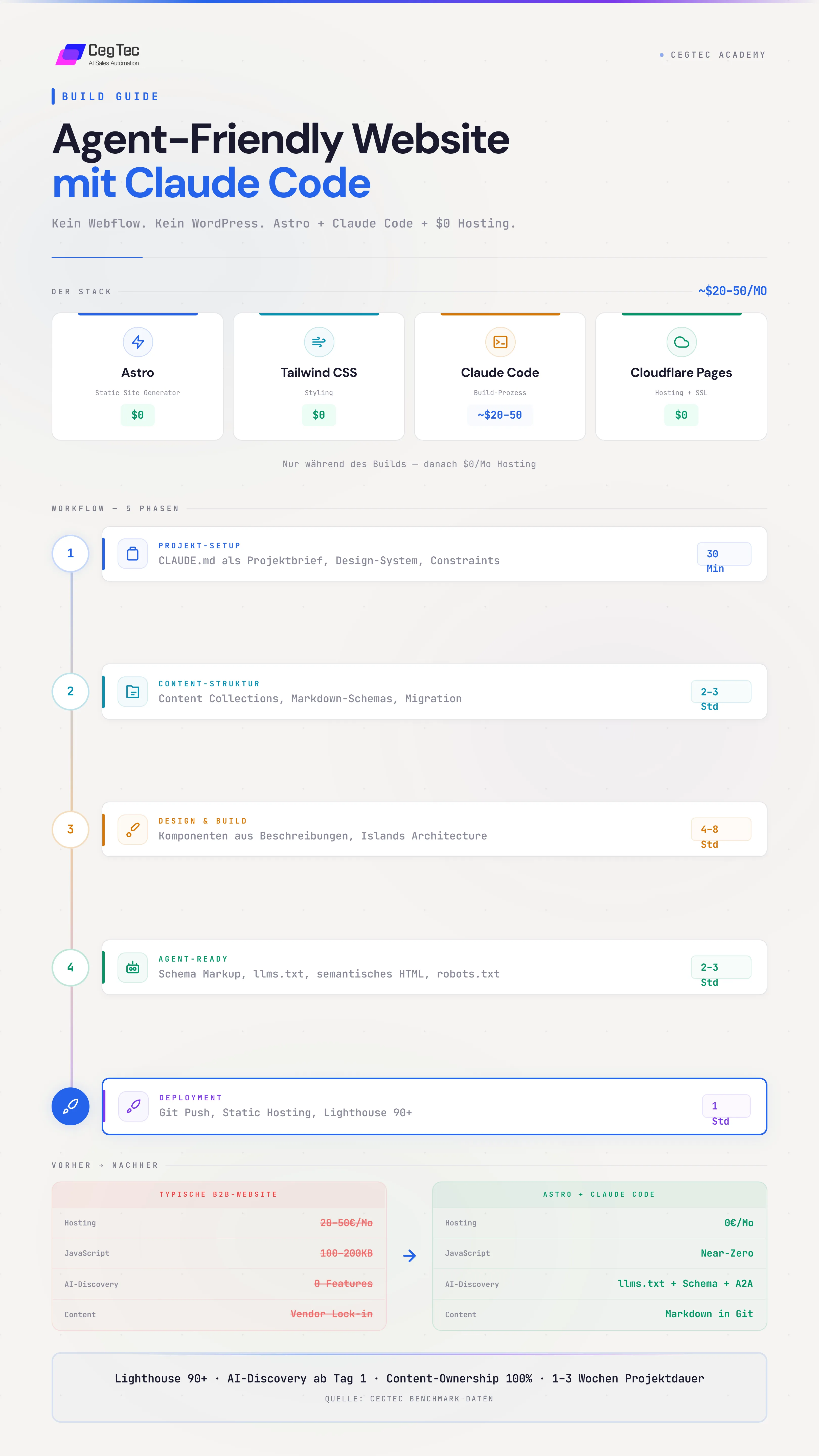
The stack
Why Astro?
There are many static site generators (Next.js, Hugo, Gatsby, 11ty). For B2B websites we recommend Astro:
Static pages don't load JS unless explicitly required. Your About page weighs 20KB instead of 200KB.
Your CMS is markdown files with type-safe schemas. No backend, no login, no vendor lock-in. Every page is a file in Git.
Interactive elements (calculators, dashboards, forms) are loaded as "islands". The rest stays static.
Astro projects are clearly structured, file-based and consistent. Claude Code can build entire pages from a description.
The workflow, 6 phases
Migrate off Webflow, WordPress & co.
Almost nobody starts from a blank site. You're moving off Webflow, WordPress, Squarespace, Wix, or something homegrown, and that migration is the part most guides skip.
How to approach it:
- Get your content out. Native export where possible (WordPress has a built-in exporter). If there's no clean export, Claude Code crawls the old site with the Playwright MCP server, extracts the text content as Markdown, and records every existing URL.
- Inventory your page types. Repeatable types (blog, case studies, team) become content collections. One-off pages (About, Contact, Pricing) become their own
.astrofiles. - Don't touch the design yet. Get content and structure over first. Doing migration and redesign at the same time is why most migrations stall for months.
Project setup
Before Claude Code writes a single line, it needs context. The CLAUDE.md file is your briefing, Claude reads it at every session start.
What goes in:
- Company name, industry, target audience
- Tech stack (Astro + Tailwind + deployment target)
- Design system (colours, fonts, spacing rules)
- Agent readiness constraints (semantic HTML mandatory, schema markup on every page, llms.txt at the root)
- Prohibitions (e.g. no div soup, no images without alt text, no JS that hides content)
Content structure
Claude Code creates the entire sitemap with content collections:
- Each CMS "collection" (blog, case studies, services, team) becomes a folder of markdown files
- Each file has a type-safe schema (frontmatter), title, description, author, tags, metrics
- Adding new content = adding a new markdown file. No CMS backend required.
Blog       -> title, description, author, tags, publishedAt
Case Study -> client, industry, heroMetric, metrics[], facts[]
Services   -> serviceCategory, services[], benefits[]
Projects   -> facts[], thumbnail, videoEmbed
FAQ -> question, category, orderDesign & build
Claude Code builds components from descriptions:
Navigation, footer, layouts, no JS in the browser. Pure HTML output.
Pricing calculators, dashboards, tab navigation, JS only where needed.
Hover states as CSS transitions. Scroll-triggered effects where they make sense.
The principle: static where possible, interactive only where necessary. That gives the fastest load times.
Make it agent-friendly
Claude Code implements the entire AI discovery layer in three levels:
- Semantic HTML: header, article, section, nav instead of generic divs
- Heading hierarchy: exactly one H1 per page, no skipped levels
- Alt text on all images
- Meta descriptions on all pages
- JSON-LD structured data on every page
- Organization, Article, Service, FAQPage, BreadcrumbList, depending on page type
- Embedded in the base layout, automatically on every page
- llms.txt in the root directory (machine-readable summary)
- robots.txt explicitly opened for AI crawlers (GPTBot, ClaudeBot, PerplexityBot)
- Optional: OpenAPI Spec, A2A Agent Card (.well-known/agent.json)
Deployment
The starter, ready to clone
Everything in this guide as a working, public Astro project: content collections, semantic HTML, schema markup, llms.txt and robots.txt already set up and tested. No CegTec branding in it, just the structure, ready for you to fill in your own brand. For what's actually in it (design skill, slash commands, prompt library), see the toolkit guide.
CLAUDE.md template as the briefing for Claude Code, a design skill that keeps every page visually consistent, two slash commands (/migrate-page, /audit-agent-friendly), a prompt library for every phase, the 3-level agent-readiness checklist, and an example content collection. Carry your existing design over exactly, or start a new one, both are built in. MIT licensed, clone it and get started.
Claude Code vs. you
- Build entire pages from a description
- Create content collections with type-safe schemas
- SEO meta, schema markup, Open Graph in one go
- Read existing code and extend it consistently
- Run accessibility audits and fix issues directly
- Make design decisions (colours, layout, tone)
- Write or approve content
- Visually verify it looks right
- Set up the deployment pipeline once
Before / after
Frequently asked questions
"Do I need to know how to code?"
No, but you do need to be comfortable with a terminal. Claude Code writes the code. You describe what you want and review the result.
"What about Webflow/WordPress, do I need to migrate?"
No. If your current CMS works, you can also retrofit agent readiness there (see the Agent-Friendly Content Guide). Migration is worth it primarily when you want content ownership, want to lower hosting costs, or are building a completely new website.
"How do I update content without a CMS backend?"
Add a new markdown file, push to Git, done. Or: prompt Claude Code "Create a new blog post about X", Claude creates the file, you commit.
"Can I really do this in 1 to 3 weeks?"
Yes, if you already have the content. The technical implementation is fast with Claude Code. What takes time is content creation and design decisions.
"What does the entire stack cost all-in?"
~$20-50/month for Claude Code API usage during the build. After that: $0/month hosting. Your ongoing costs are essentially zero.
Don't want to build it yourself?
We do this for you, agent-friendly websites for B2B companies in the DACH region. Migration, templates, AI discovery, all from one team.
Book a free intro callUnderstand the AI layer first?
Read our guide on agent-friendly content, the foundation for everything built in this guide.
Agent-Friendly Content Guide