
Making outbound predictable: the capacity model
From the meeting target backwards to contacts, email volume, inboxes and domains. The formulas and the logic for sizing outbound capacity properly.
Why outbound so often stays a guessing game
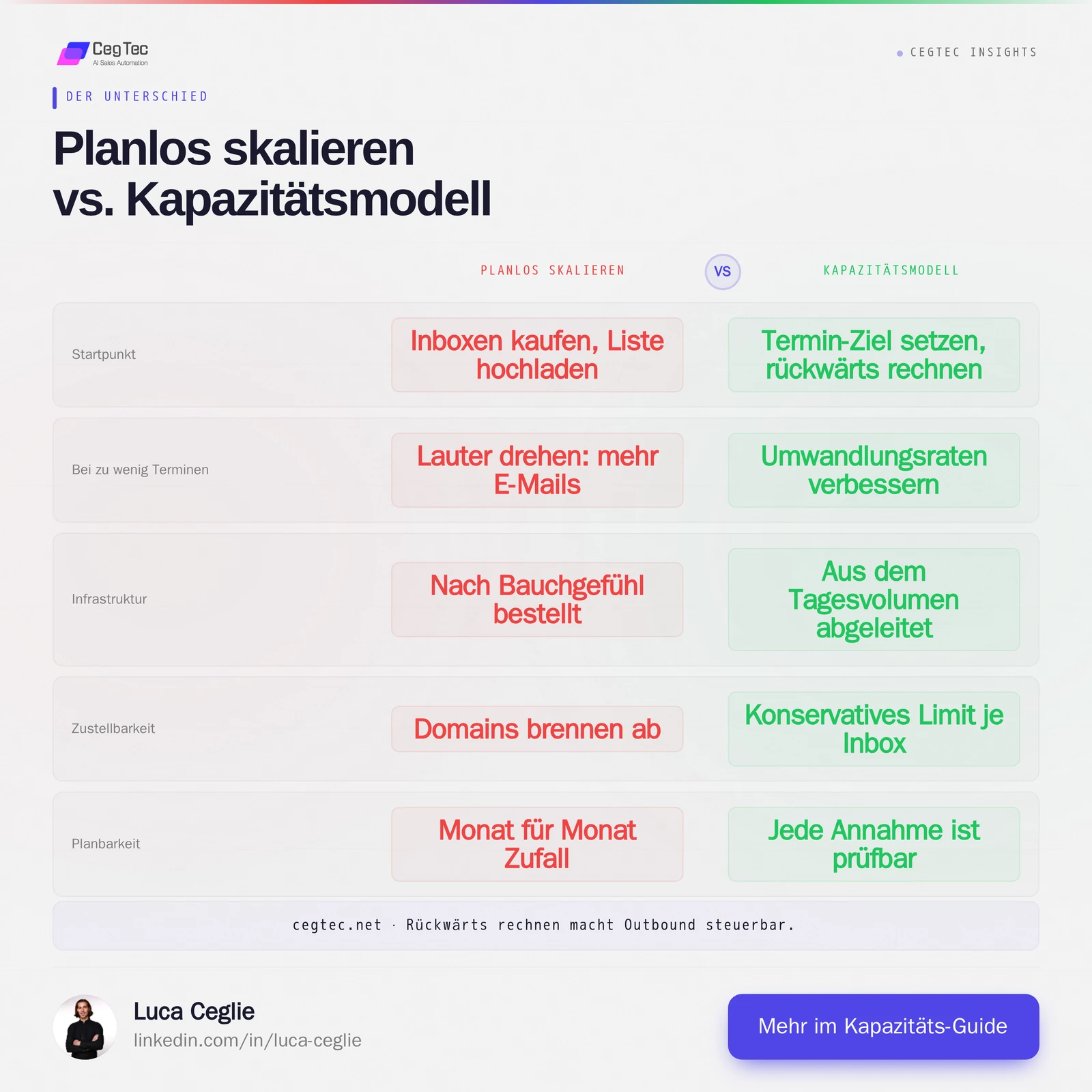
Most teams start outbound from the wrong end. They buy a few inboxes, upload a list and hope enough meetings come out at the end. When the numbers do not add up, they turn the volume up: more emails, more accounts, more pressure. The result is usually the opposite of predictable. Domains burn out, deliverability drops, and nobody can say why one month works and the next does not.
Outbound only becomes predictable when you treat it as a capacity calculation. You define the goal at the end of the funnel and work backwards: how many qualified replies do you need, how many contacts must you approach for that, how much email volume does that mean, and how many inboxes and domains carry that volume cleanly. Every stage is a simple division. Together they form a model you steer instead of hope through.
The funnel, read backwards
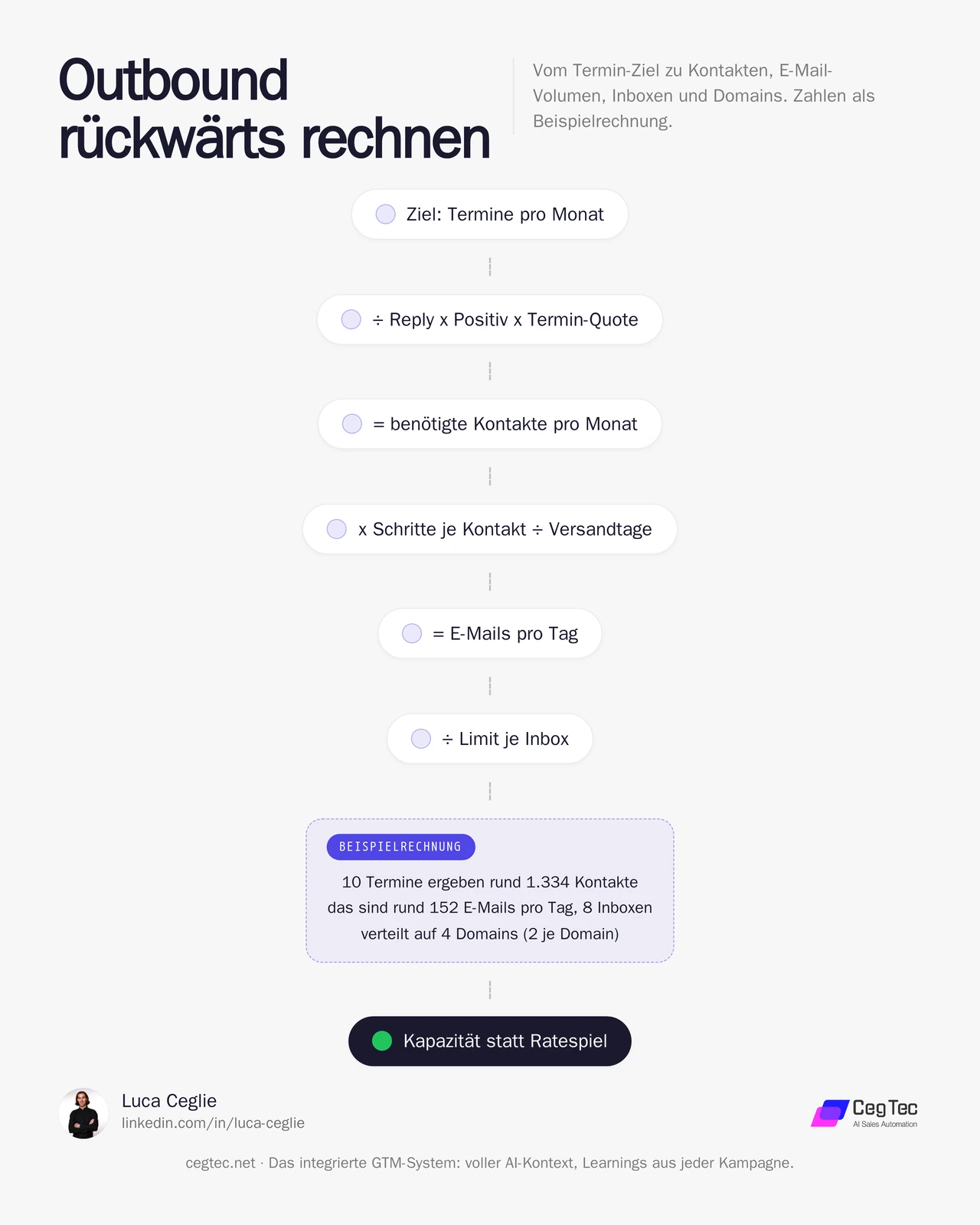
Outbound is a chain of conversion rates. Top to bottom it looks like this:
- Contacted people (recipients approached)
- Replies (reply rate on the contacted people)
- Positive replies (share of replies showing interest)
- Meetings (positive replies that become a conversation)
For planning you invert the chain. You start at the meeting target and divide upwards stage by stage. The only requirement: you need honest assumptions for every conversion rate. At the beginning those are estimates from benchmarks or first campaigns. After a few weeks you replace them with your real numbers. That replacement is exactly what makes the model precise over time.
The base formula
The core is a single chain of divisions:
Required contacts = meeting target / (reply rate x positive rate x meeting rate)
Everything else hangs off that number. Once you know how many people you must reach, the email volume follows from the number of steps in your sequence, and from that the number of inboxes and domains.
Worked example: from goal to contacts
Important upfront: the numbers below are an illustration to show the logic. They are not CegTec results and not guaranteed market values. Insert your own assumptions.
As a worked example, assume a team wants 10 qualified meetings per month. Assumed conversion rates:
- Reply rate: 5 per cent of those contacted reply
- Positive rate: 30 per cent of replies are positive
- Meeting rate: 50 per cent of positive replies become a meeting
The effective conversion from contact to meeting is therefore:
0.05 x 0.30 x 0.50 = 0.0075, i.e. 0.75 per cent.
Required contacts:
10 / 0.0075 = 1,334 people per month
From 1,334 people contacted, this example produces roughly 67 replies, of which 20 are positive, yielding 10 meetings. You can see immediately where the levers are. If the positive rate doubles from 30 to 60 per cent, the required contact count halves to around 667. Better audiences and sharper messages reduce the volume requirement drastically. More volume is always the most expensive and riskiest dial.
From contacts to email volume
Contacts are not the same as emails. In a sequence every person receives several messages unless they reply first. For reliable planning, use an average number of sent steps per contact.
As a worked example: a sequence has 3 steps, and on average 2.5 of them are actually sent per contact, because some people reply or drop out beforehand.
1,334 contacts x 2.5 emails = 3,335 emails per month
Across a working month of roughly 22 sending days:
3,335 / 22 = about 152 emails per day
That daily figure is the number that actually matters for planning. Deliverability does not depend on monthly volume but on how much a single inbox sends per day.
From email volume to inboxes and domains
This is where it is decided whether outbound stays healthy. An inbox tolerates only a limited daily volume before reputation suffers. A conservative planning value sits well below what would be technically possible, because you need buffer for warmup, weekend pauses and reputation fluctuations.
As a worked example we use 20 cold emails per inbox per day as a safe ceiling.
152 emails per day / 20 per inbox = 8 inboxes
Now the domains. You spread inboxes across several domains so a reputation problem does not hit your whole system. A common planning value is 2 to 3 inboxes per domain.
As a worked example with 2 inboxes per domain:
8 inboxes / 2 = 4 domains
Important: these domains should run separately from your main domain. Your company domain, which carries invoices and customer conversations, never belongs in cold sending. Reputation damage there is business-critical.
The model at a glance
For the same example the chain works out as:
- Goal: 10 meetings per month
- Contacts: around 1,334 per month
- Emails: around 3,335 per month, about 152 per day
- Inboxes: 8
- Domains: 4
Change a single assumption and the whole chain recalculates. That is the value of the model. It makes conflicts visible before they cost money. Anyone wanting 30 meetings but holding only 8 inboxes sees immediately that the maths does not work — and can decide: build more infrastructure, or improve the conversion rates first.
The thinking errors the model exposes
- Turning up the volume instead of the relevance. Increasing volume is tempting because it is easy. But every additional inbox costs money, warmup time and reputation risk. Improving conversion rates, by contrast, scales without new infrastructure.
- Trying to build capacity with a switch. Inboxes and domains need weeks of warmup before they carry their planned volume. Capacity is a lead-time quantity, not an immediate measure. Anyone wanting 30 meetings in February should have ordered the domains in December.
- Planning with wishful rates. The model is only as good as its assumptions. Use conservative benchmarks at the start and replace them promptly with your real numbers from the first campaigns.
Prompts: calculating the model yourself
Two reusable prompts handle the two calculation steps that come up most often in the capacity model: deriving the required volume from the meeting target, and the infrastructure from the daily volume. Both are deliberately generic. Copy them, insert your own assumptions, done. The example values are pure illustration, not guaranteed rates.
1. Capacity calculator
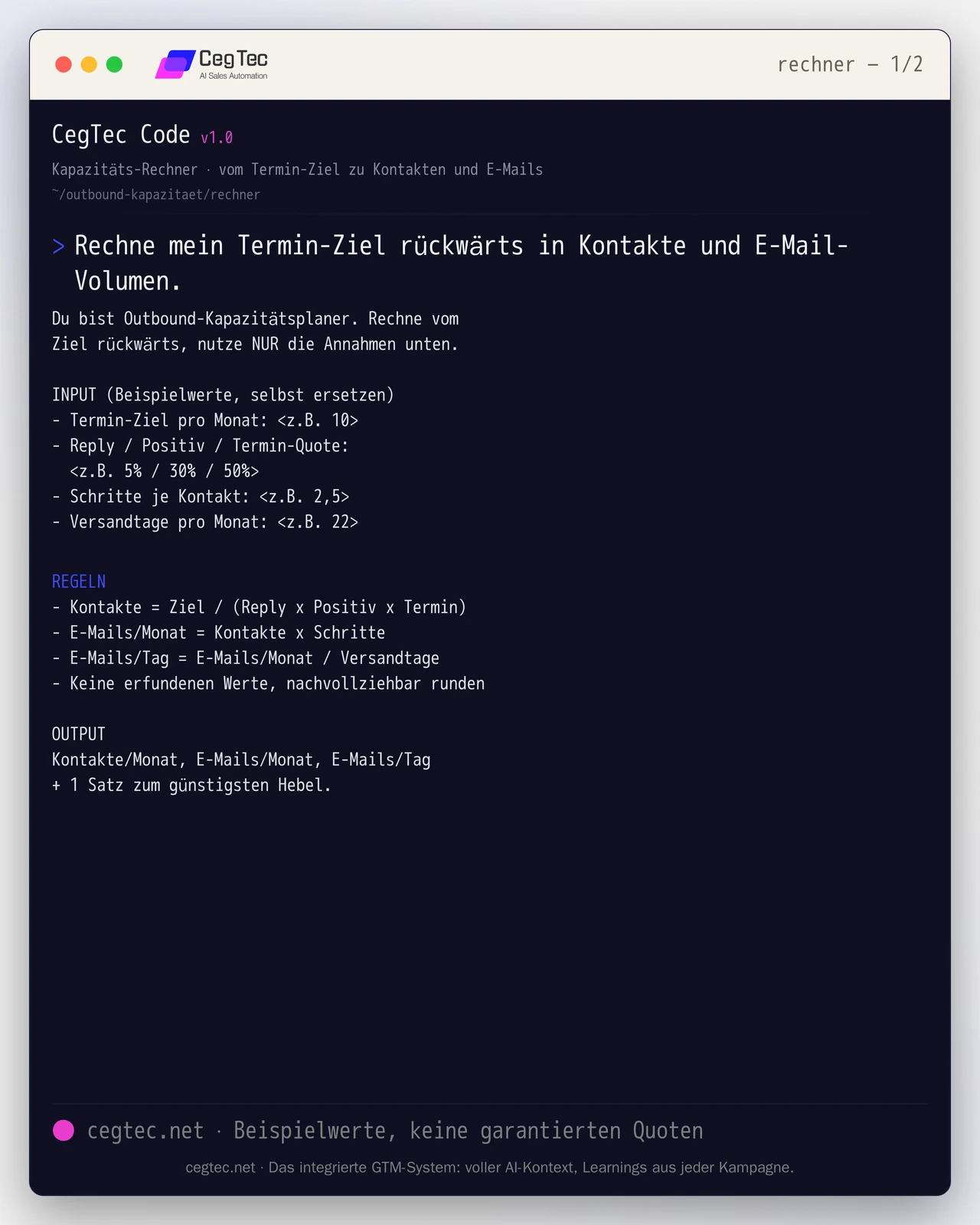
Takes goal and conversion rates, returns contacts per month, emails per month and the planning-relevant daily figure. Insert your own assumptions — the numbers in the prompt are only an example.
You are an outbound capacity planner. Calculate backwards from the goal, use ONLY the assumptions below.

INPUT (example values, replace them)
- Meeting target per month: <e.g. 10>
- Reply / positive / meeting rate: <e.g. 5% / 30% / 50%>
- Steps per contact: <e.g. 2.5>
- Sending days per month: <e.g. 22>

RULES
- Contacts = goal / (reply x positive x meeting)
- Emails/month = contacts x steps
- Emails/day = emails/month / sending days
- No invented values, round transparently

OUTPUT
Contacts per month, emails per month, emails per day plus 1 sentence on the cheapest lever.2. Inbox and domain requirement
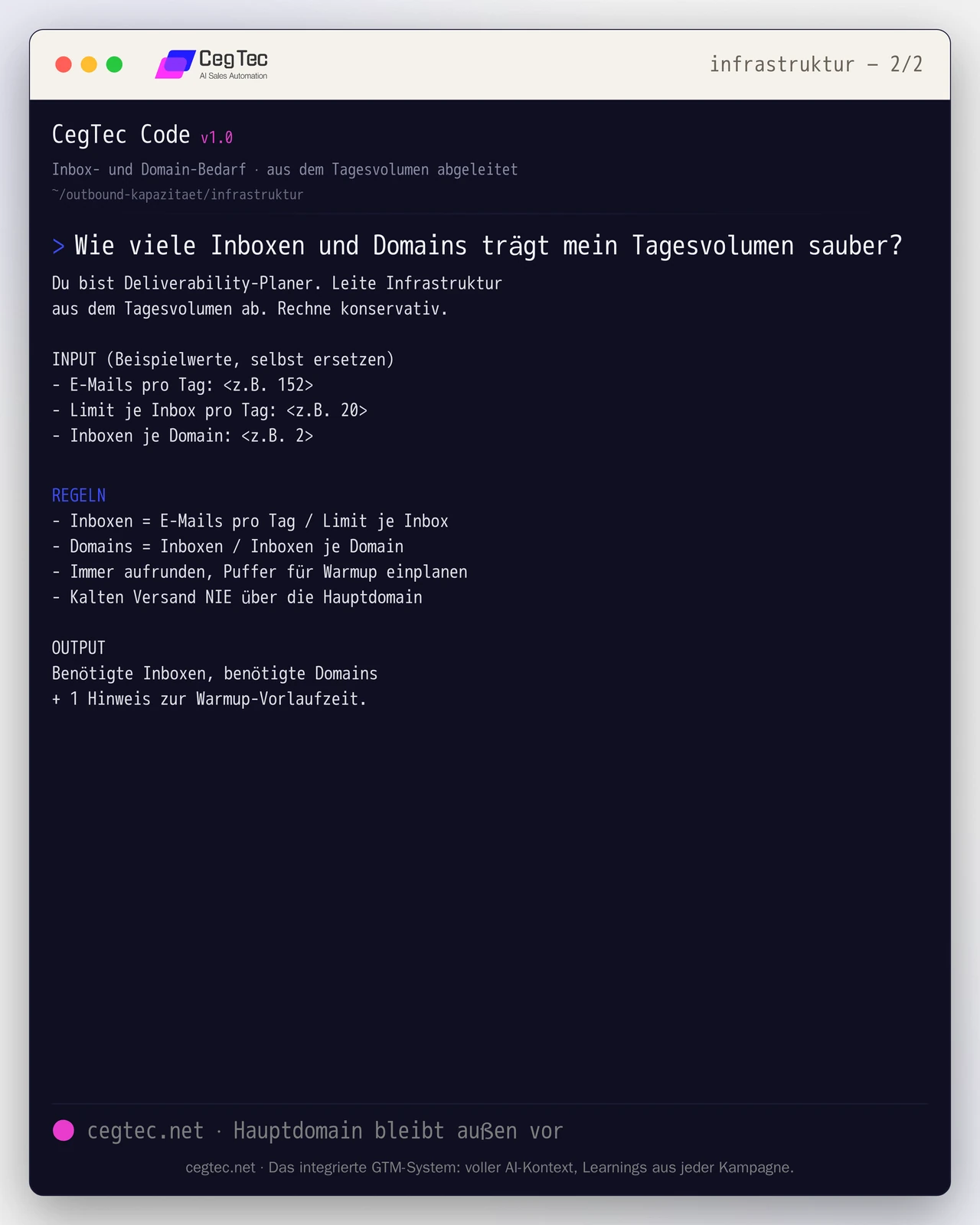
Takes the daily volume and the conservative limits, returns the required number of inboxes and domains. Forces the main domain to stay out of it and warmup lead time to be planned in.
You are a deliverability planner. Derive infrastructure from the daily volume. Calculate conservatively.

INPUT (example values, replace them)
- Emails per day: <e.g. 152>
- Limit per inbox per day: <e.g. 20>
- Inboxes per domain: <e.g. 2>

RULES
- Inboxes = emails per day / limit per inbox
- Domains = inboxes / inboxes per domain
- Always round up, plan buffer for warmup
- NEVER send cold email over the main domain

OUTPUT
Required inboxes, required domains plus 1 note on warmup lead time.How to generate pipeline with this (in the GTM stack)
A capacity model on paper is a plan. Pipeline only emerges when a GTM stack translates the calculation into operation and adjusts it over time against your real numbers. Such a stack is made of interchangeable roles:
- Target planning: holds the meeting target and conversion rates and derives contact and sending volume from them.
- Data and signal: supplies the target set and flags who is relevant right now.
- Enrichment: validates contacts and fills the fields a sequence needs.
- Orchestration and decision: translates target set into capacity and steers the remaining roles; routine steps run automatically, consequential ones go for approval first.
- Sending capacity (email and LinkedIn): carries the planned daily volume across inboxes, domains and profiles within safe limits.
- CRM: records outcomes and feeds the real conversion rates back into the model.
You can fill these roles with any tools; the stack is freely selectable. What matters is the connection between them: a category-agnostic orchestration layer such as GTM Goat can translate target set into capacity and address the remaining roles by category rather than being tied to a single vendor. That way the capacity model does not stay theory but becomes a running system.
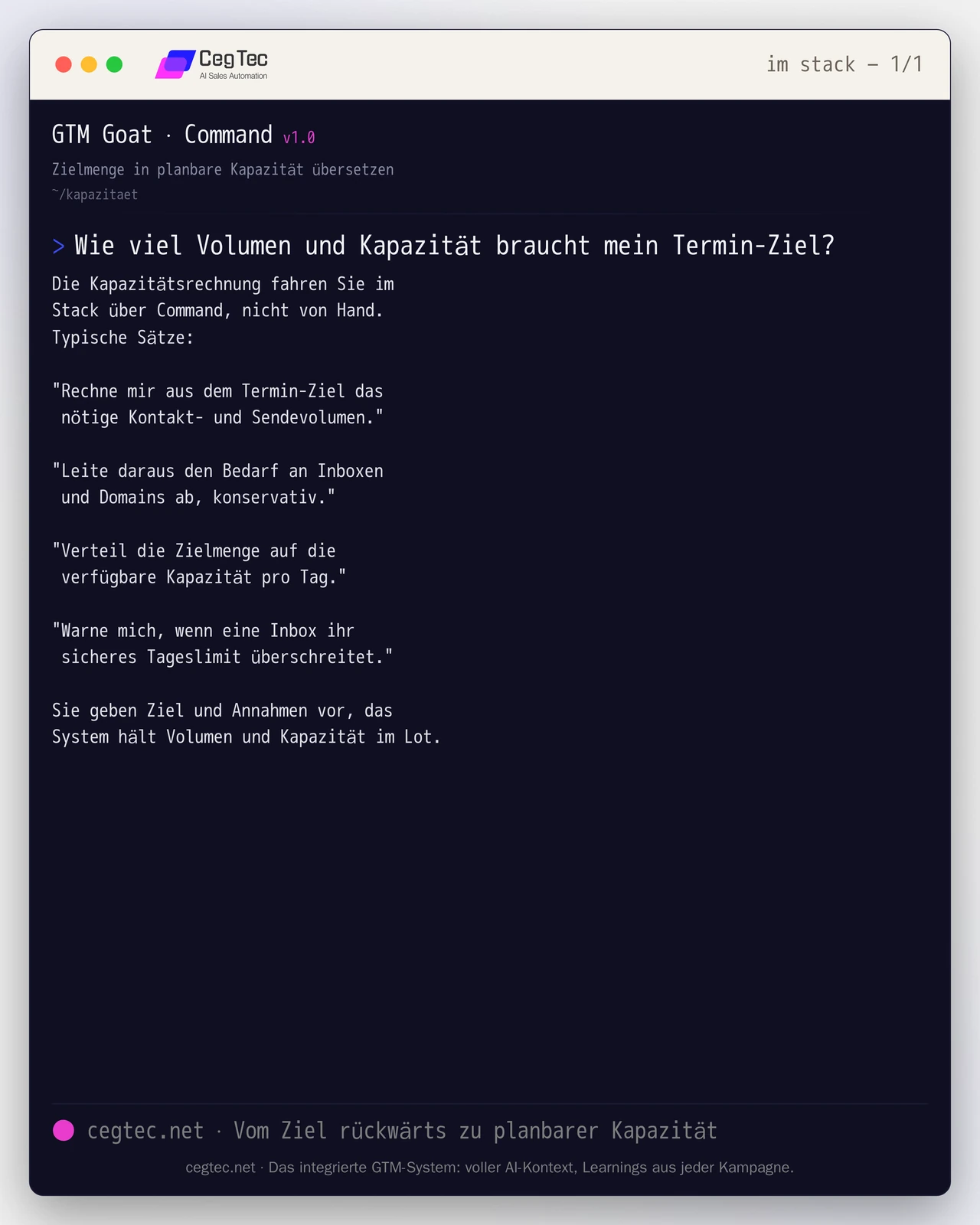
In practice that means: you state goal and assumptions in ordinary language, and the orchestration layer runs the capacity chain and distributes the volume across the available infrastructure. A few typical instructions:
You run the capacity calculation in the stack via Command, not by hand.
Typical sentences:

"Calculate the required contact and sending volume from the meeting target."

"Derive the inbox and domain requirement from that, conservatively."

"Distribute the target set across the available capacity per day."

"Warn me if an inbox exceeds its safe daily limit."

You set goal and assumptions, the system keeps volume and capacity in balance.The quickstart shows how to set up such a stack from scratch.
Conclusion
Outbound becomes predictable as soon as you calculate it backwards. The meeting target determines the contact count, the contact count the email volume, the volume the inboxes and domains. Every stage is a division, and every assumption is testable. The model replaces neither a good audience nor a good message, but it tells you how much infrastructure you really need and where the cheapest lever sits.
If you want to set up your own capacity model with real conversion rates and steer it automatically, we will show you what that looks like in practice. Take a look at GTM Goat or talk to us.
Next step
GTM Goat runs exactly what you just read.