
Build a LinkedIn custom audience from buying signals
From buying signal to LinkedIn Matched Audience: pick a source, qualify rows, export a CSV — and what does not work with ChatGPT Ads.
An audience built on an event instead of a filter
The usual LinkedIn audience comes out of filters: industry, company size, job title, region. The result is a set of people who might fit your profile — with no indication that anything is currently happening.
A signal-based audience works the other way round. It starts with an observable event: someone posts a job ad that describes your problem. Someone moves into a role where they decide. Someone comments under a post about exactly your topic. Only then comes the question of whether the company behind it fits your ICP at all.
This guide walks the full do-it-yourself path: from the signal through a qualified table to the CSV you upload in LinkedIn Campaign Manager. And at the end it says plainly why the same path does not work for ChatGPT Ads — and what to do there instead.
Every platform figure in this guide is as of 09/2026. For LinkedIn Ads and ChatGPT Ads we at CegTec have measured no results of our own, so you will find no CPC, match rate or conversion numbers here that do not exist.
The path in five steps
- Pick the signal — which event defines your audience?
- The signal becomes a table — one row per company or per contact.
- Qualify — an ICP fit column that returns a score.
- Export — the filtered rows as a CSV.
- Upload — LinkedIn Matched Audiences, company list or contact list.
Step 6 is the honest round on ChatGPT Ads, step 7 closes the loop back into outbound.
Step 1: Pick the signal
In GTM Goat you create a table and give it a source. The source determines which events become rows. Available sources include:
| Source | What it delivers |
|---|---|
| Company pool | Companies matching criteria from an existing stock |
| Lookalike | Companies resembling your own closed deals |
| Google Maps | Local businesses by category and radius |
| Job ads (Indeed) | Companies currently hiring for a specific role |
| Apify Actor | Any scraping source of your own |
| LinkedIn post engagers | People who reacted to a specific post |
| Job changes / new decision-makers | People who just started a new role |
| LinkedIn profile monitoring | Reactions to your own posts and profile |
| LinkedIn keyword monitoring | Posts and comments on defined terms |
| Webhook | Events from any connected system |
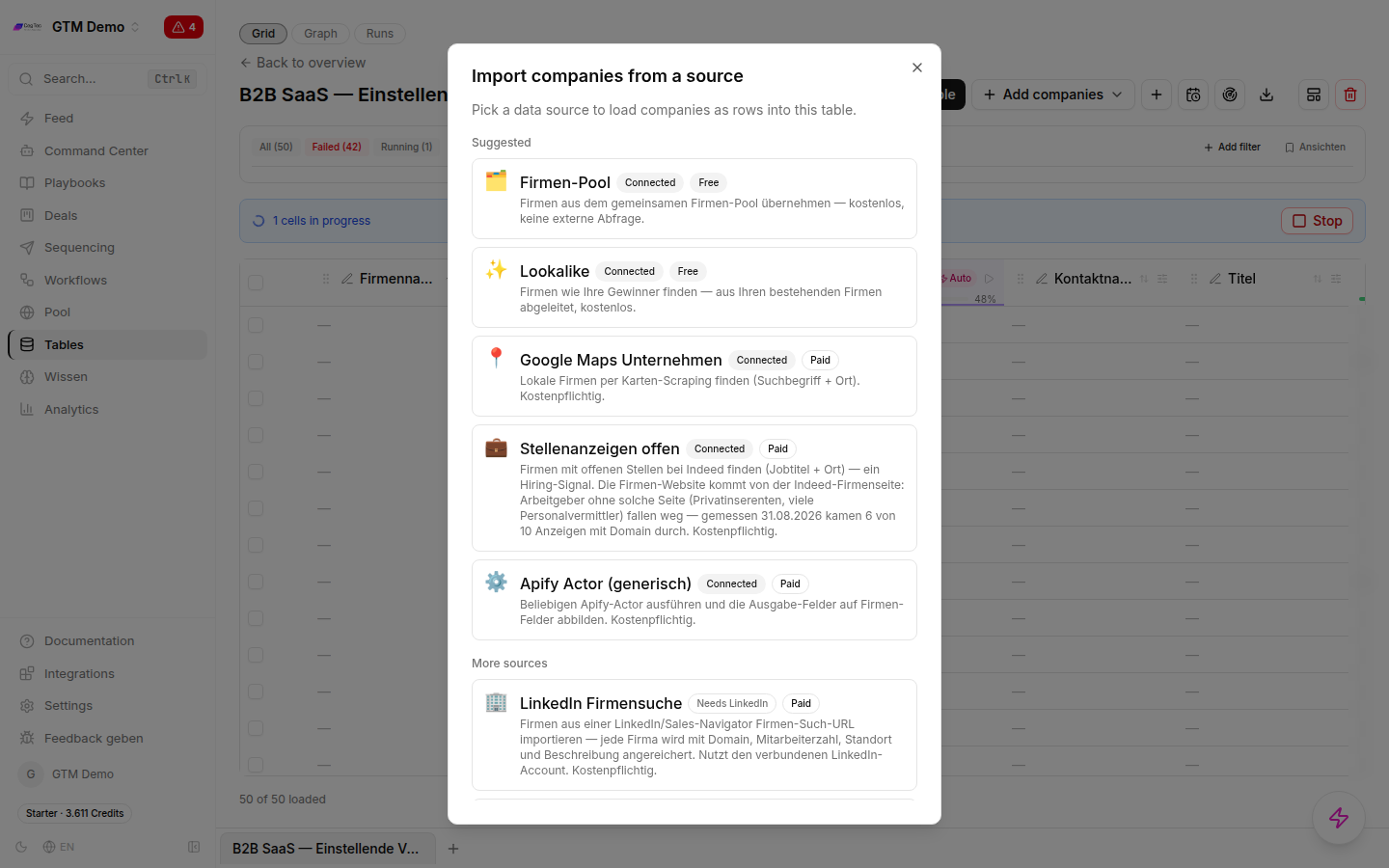
The source dialogue: this is where you decide which event defines your audience.
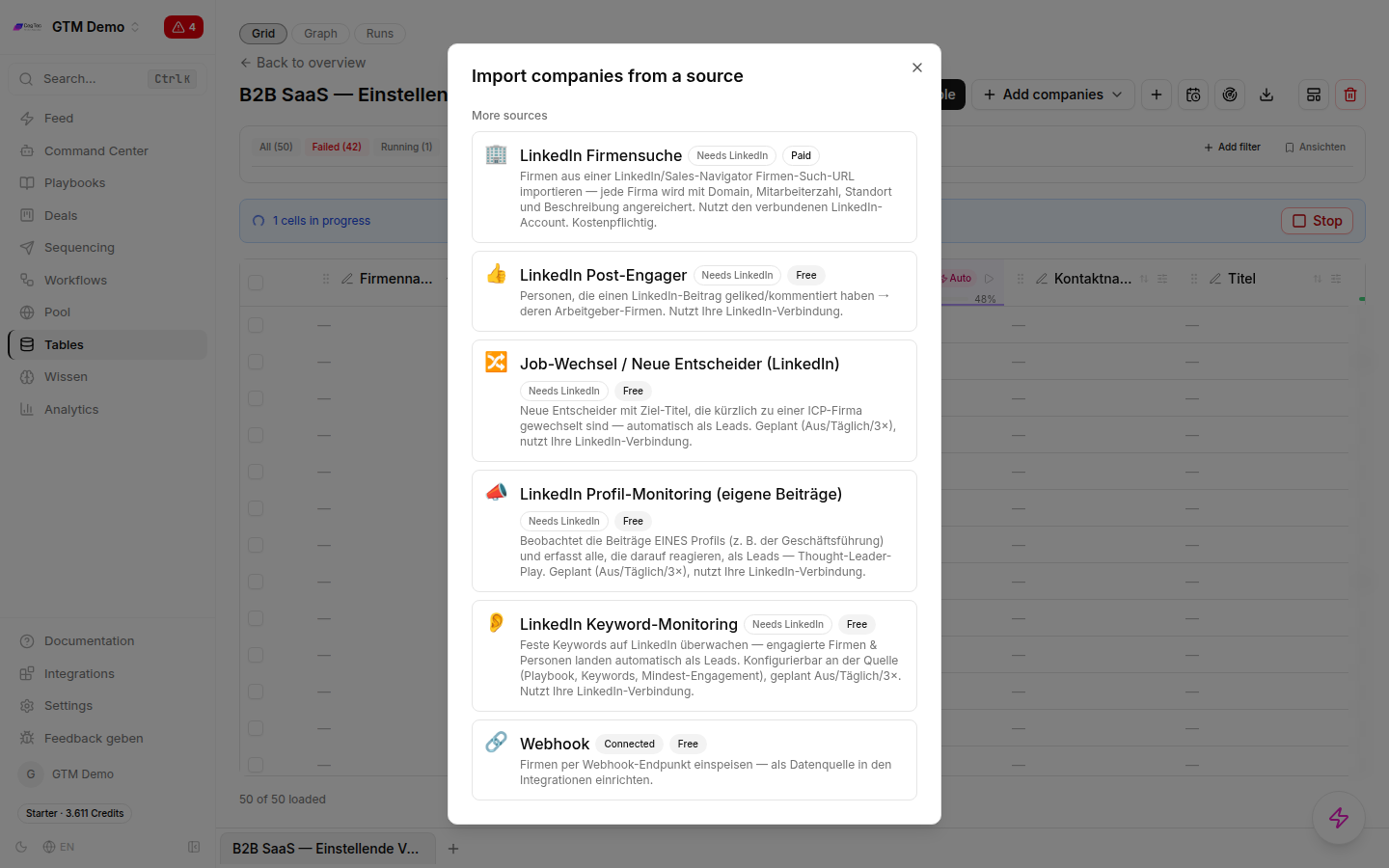
Further down the same list sit the LinkedIn-adjacent signals and the webhook.
Two things we will not dress up
Profile views are a real signal. The platform has a native event for someone viewing your profile, and likewise for engagement with your posts. Both can be used as a source. Someone who looks at your profile after you posted about a topic is a better starting point than any filter hit.
Website visits are not a signal this product produces. GTM Goat does not identify anonymous website visitors. There is no visitor-identification source, and we do not claim there is one. If you want to use website signals, you need your own analytics or visitor tool that recognises companies and fires an event. You send that event into a table through the webhook source — from there it is qualified like any other signal. The identification happens in the upstream tool, not here. Also check that tool’s legal basis before you turn its output into an advertising audience.
Step 2: The signal becomes a table
Matches from the source land as rows in a table. Every table has a binding: company or lead — one row per company or one row per person. That decision is made early and carries through to the upload, because LinkedIn accepts company lists and contact lists separately.
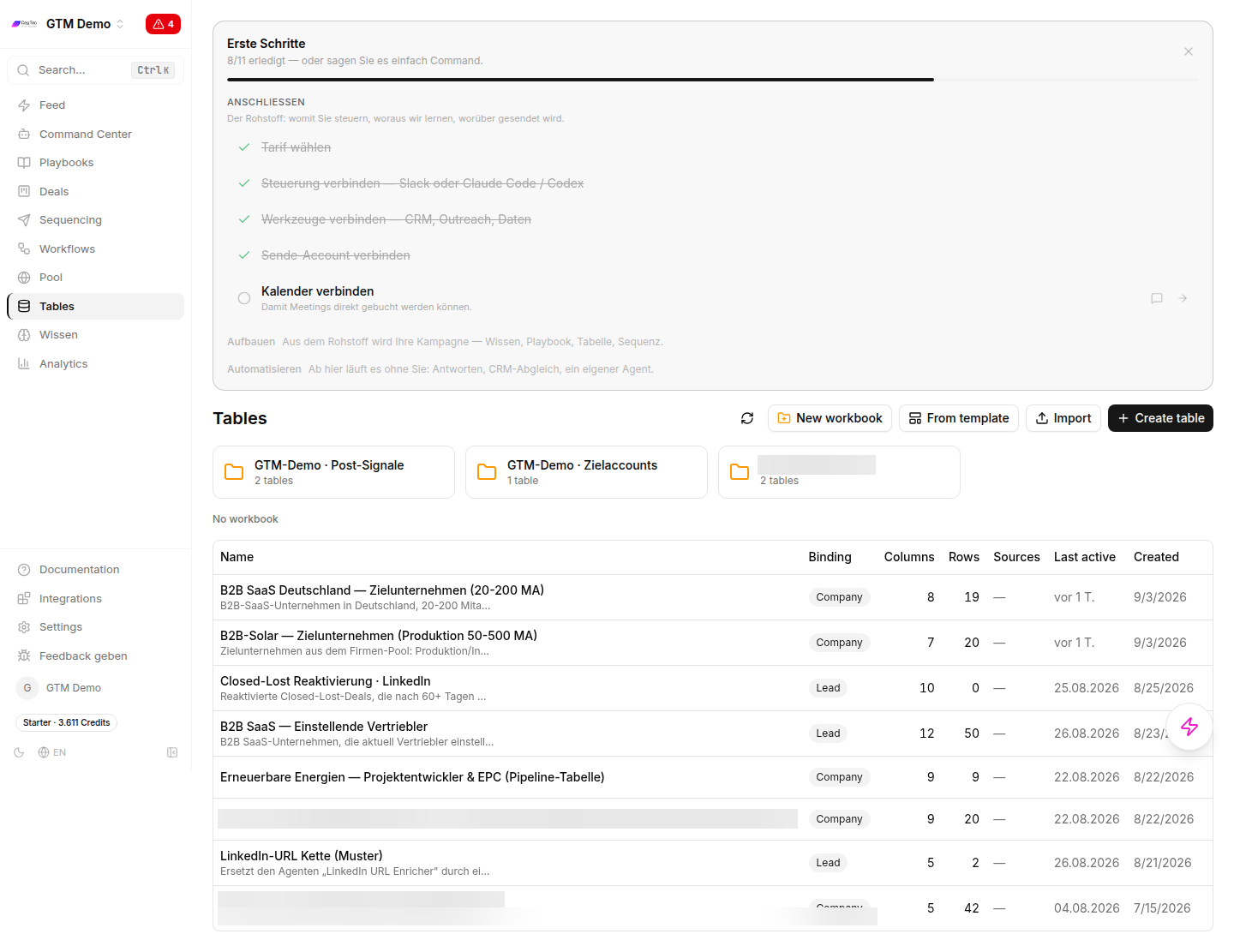
Table overview: binding, column count and row count at a glance.
Columns here are not passive fields but one action per row: web research, enrichment, qualification, contact discovery. Each column runs across all rows and shows its progress.
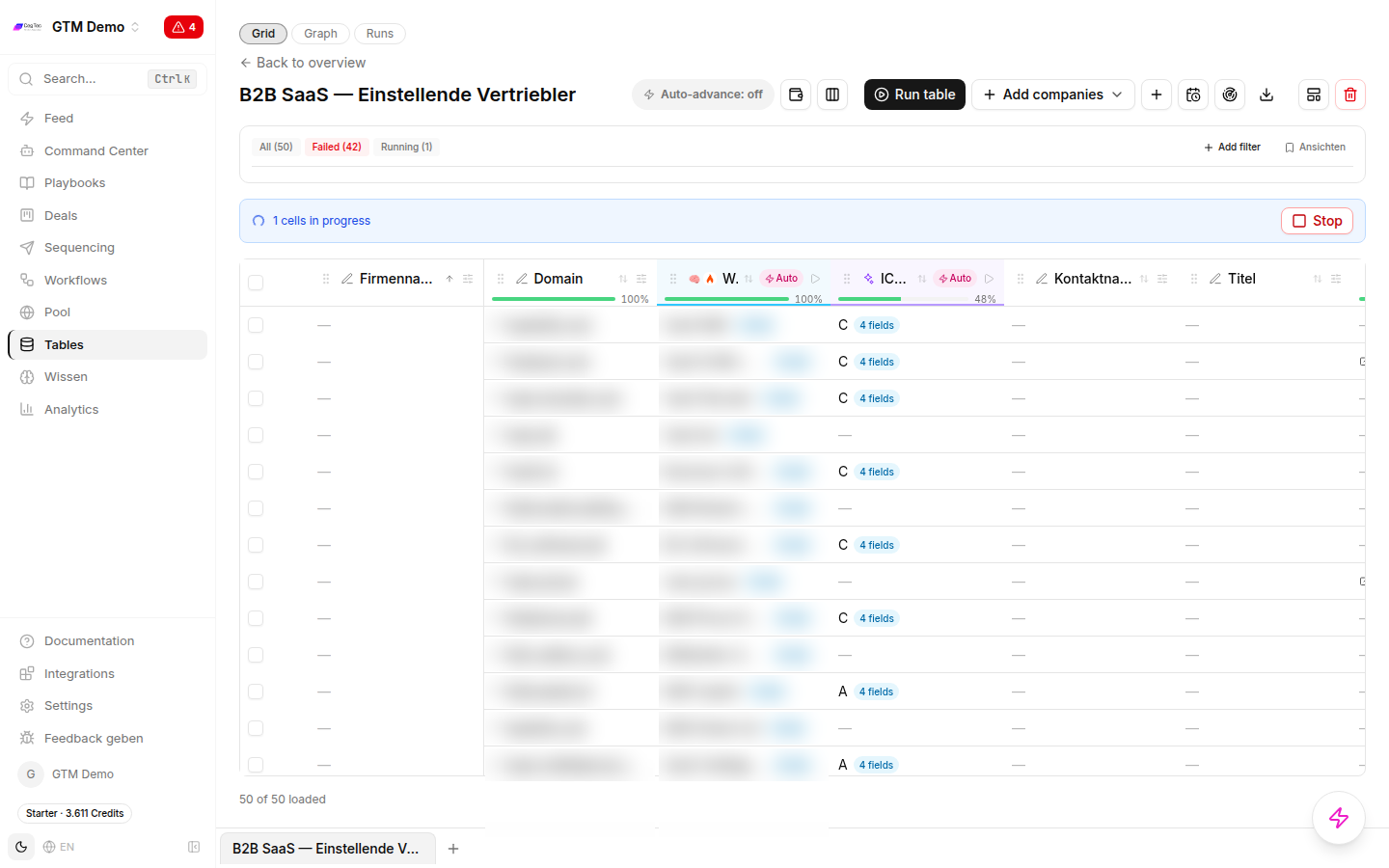
Every column is an action per row; the progress bar shows the run.
In the screenshot one column carries a failed counter. That is normal operation: individual cells fail on rate limits, or because a company simply has no findable domain. Cells are re-runnable — so a clean list build always includes a second pass over the failed cells before you export.
Step 3: Qualify — this is where the audience appears
A signal list is not yet an audience. It becomes one the moment you can filter it. That is exactly what the ICP fit column is for: it takes a qualification prompt and an output schema and returns a structured result per row:
fit_score— a numeric value you can sort and cut ontier— a coarse band for fast filteringreasoning— the justification, so you can defend a selection
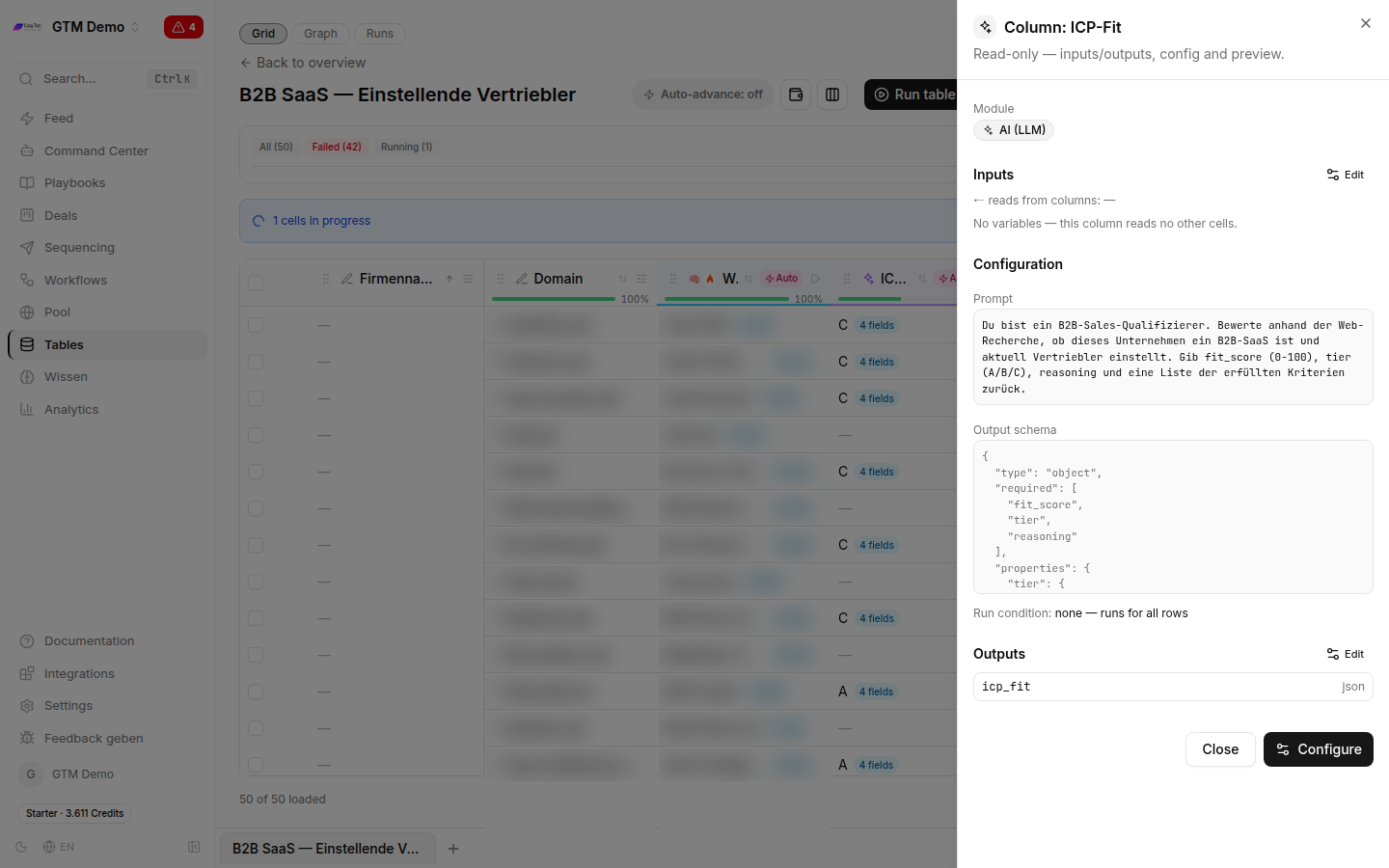
The ICP fit column: prompt, output schema and run condition in one place.
Two points make the difference:
Write the schema, not just the prompt. You cannot filter a free-text verdict (“good fit”). You can filter a fit_score. Only a structured field turns 800 signal rows into an audience with a cut-off you can justify.
Use run conditions as your cost brake. Every column can carry a condition that decides which rows it runs on at all. The pattern is always the same: the cheap check across all rows first, then the expensive enrichment only on the rows that passed. Run contact discovery and deep research on all 2,000 raw rows and you pay most of it for companies you will filter out later anyway.
Three columns are enough for a first build: a research column that describes the company, an ICP fit column that turns it into a score, and — for contact lists — a contact column that only runs on the qualified rows.
Step 4: Export
Filter the table down to the rows you want to keep (for example fit_score above your threshold) and export from the table toolbar: download icon → Export as CSV.
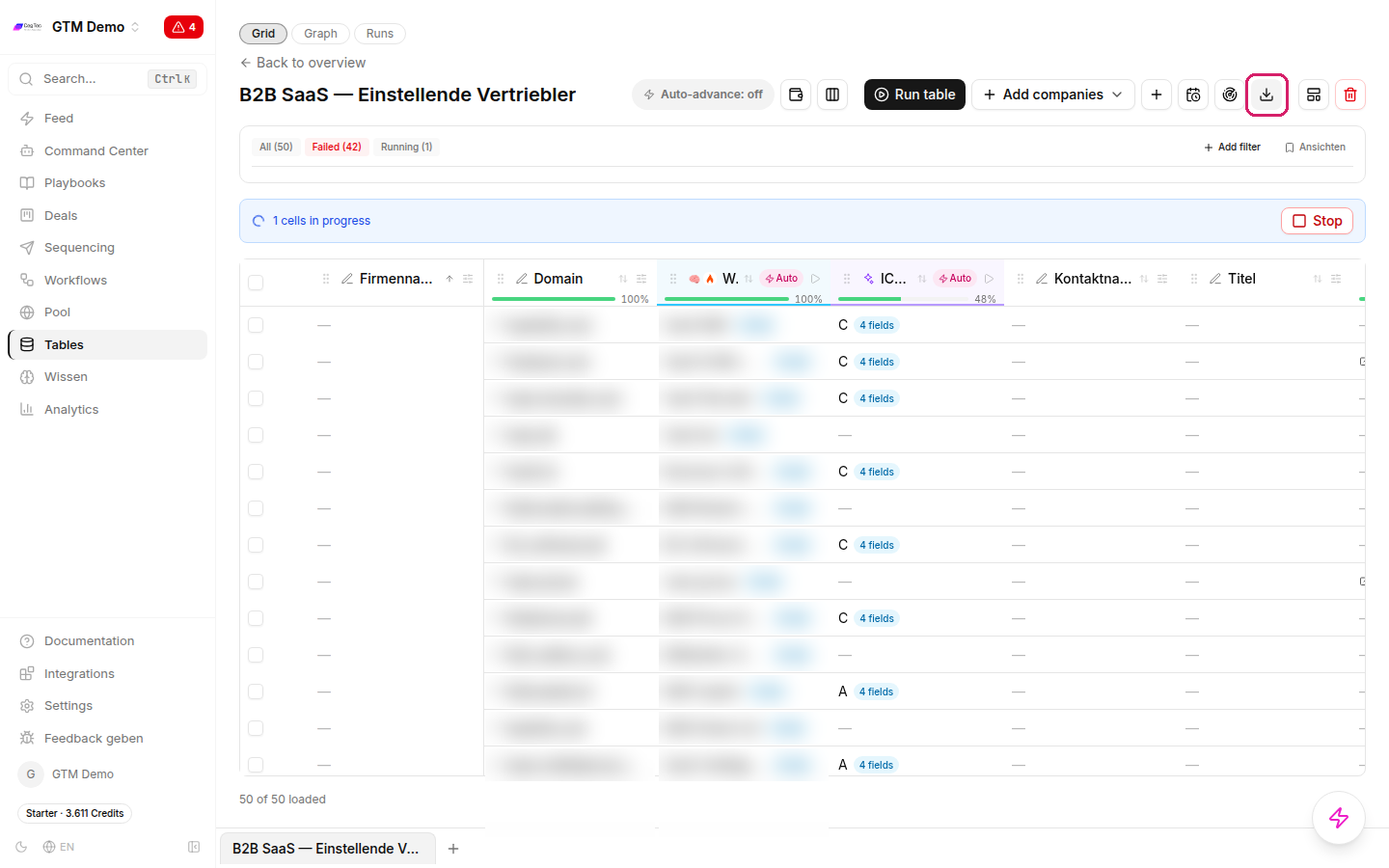
Download icon in the table toolbar, then Export as CSV — that is the bridge to LinkedIn.
This CSV is the handover format. Everything after this happens in LinkedIn Campaign Manager.
The economic case: only your target accounts see the ad
Before you upload the file, it is worth being clear about what you are actually buying. The leverage of a custom audience is not the click price — it is the spread. With broad LinkedIn targeting (industry + company size + job title) you pay for reach inside a category: the filter describes a type of company, not your actual buyers. A substantial share of the impressions delivered therefore goes to people who will never buy. That spread is designed into the model; it is not an execution error.
With a signal-based custom audience the opposite holds: every delivered impression goes to a company or a person you qualified beforehand — through the signal and the ICP fit column from step 3. The waste is not optimised down after the fact, it is designed out beforehand.
What this actually solves
Too few suitable leads — not too few leads. Filter targeting delivers volume and sales sorts it out afterwards. The signal audience qualifies before budget is spent: the filter sits ahead of the spend, not behind it. Your budget works exclusively inside your ICP.
Missed timing. Normally people get approached when it suits the sales calendar. A signal turns that around: the ad runs because something happened — a sales role was posted, a decision-maker changed jobs, someone visited your profile or commented on a post. You are present in the window of need instead of permanently present against a category.
A cold first touch. The most common reason for low reply rates is an unknown sender. If the same list has already seen your ad, the name is familiar when the sequence arrives — ad and outreach run on one qualified set instead of two unrelated audiences. How that handover works in practice is step 7. The goal is not more contacts, but warmer ones.
Replied, but never converted. Someone who answered once and then dropped off otherwise disappears from view. A list you maintain yourself keeps exactly that segment visible through retargeting.
Budget that grows with reach. With a defined list of, say, 500 target accounts you do not need a reach budget — you need frequency on 500 companies. That makes the amount smaller in absolute terms and, above all, plannable, instead of scaling with audience size.
Ad ROI you cannot demonstrate. Long B2B cycles and small target markets make broad reach expensive and hard to attribute. Against a known account list, by contrast, you can check where something moved. On top of that comes control over the reverse: existing customers, competitors and obviously unsuitable companies can be actively excluded — with pure filter targeting you do not even know precisely who you are advertising to.
The metric you should watch
Not the nominal cost per lead, but the cost per qualified lead — and the share of your budget spent on non-targets. A cheap click from outside your ICP is more expensive than a dear click from a target account, because only one of the two can ever become pipeline.
For orders of magnitude — third-party market benchmarks, as of 09/2026:
| Metric (market benchmark) | Value |
|---|---|
| LinkedIn CPC | approx. USD 5–8 |
| LinkedIn B2B CPL via Lead Gen Forms | approx. USD 50–130 (median ~USD 75–110) |
| LinkedIn B2B CPL via a landing page | approx. USD 150–250+ |
| Outside North America | roughly 20–35 % lower |
These figures are heavily North-America-weighted; no reliable public figure specific to the DACH region exists. Use them as an orientation on the order of magnitude, not as a forecast and not as a target — and we at CegTec have measured no cost per lead of our own for LinkedIn Ads, which is why you will not find one here.
A worked illustration — an illustration, not a result: take the bottom of the benchmark, USD 5 per click, and a budget of USD 2,000; that is 400 clicks. If broad targeting puts 3 out of 4 clicks outside your ICP, 100 usable clicks remain — the effective price per click from the target segment is then USD 20 instead of USD 5. If the same 400 clicks come out of a qualified list, the effective price stays close to the nominal one. This is arithmetic on rounded assumptions, not a measured outcome: the “3 out of 4” rate is an assumption you have to check in your own account.
The case against
- Narrow audiences tend to cost more per impression. You are bidding on a small inventory, so the cost per thousand rises. The comparison is therefore only worth making at the level of qualified contacts, not at the level of the click price.
- The 300 matched members floor is hard. Below it the campaign will not run — more on that in the next step.
- The match rate decides how much of your list LinkedIn reaches at all. Only a share of the exported rows arrives in the finished audience. At small list sizes that is the main reason to target at company level.
And one limitation on our own account: that ad plus sequence converts better than the sequence alone is a plausible mechanism — repeated contact and recognition. We have not measured it. You will therefore find no percentage attached to it here, only a rationale you should verify in your own account.
Step 5: Upload to LinkedIn Matched Audiences
In Campaign Manager you create a new list under audiences and upload the CSV. Two upload types are available: company list or contact list. These rules then apply (as of 09/2026):
| Rule | Value |
|---|---|
| Minimum in the uploaded file | 300 rows |
| Minimum to run in a campaign | 300 matched members |
| LinkedIn recommendation, company targeting | at least 1,000 companies |
| LinkedIn recommendation, contact targeting | at least 10,000 e-mail addresses |
| Maximum file size / records | 20 MB / 300,000 records |
| Audience generation time | up to 48 hours |
| Required targeting facet | Location |
Follow LinkedIn’s formatting guidelines when building the file — column names and structure have to match or the upload fails. When in doubt, download LinkedIn’s own template and paste your export into it rather than guessing at column names.
The practical consequence for B2B
A signal-based B2B list typically holds 300 to 3,000 rows. That puts you above LinkedIn’s hard minimum but clearly below its recommendation — especially for contact lists, where 10,000 e-mail addresses are recommended. Three things follow:
- Match rates become the bottleneck. Only a share of 800 rows arrives in the finished audience. Plan for that instead of discovering it afterwards.
- At this size, company targeting usually beats contact targeting. Company names and domains match more reliably than private e-mail addresses, and the recommended threshold is ten times lower. Add job title or function filters in the campaign setup on top of the company list rather than uploading individuals.
- Build in the buffer. If your qualified list sits just above 300, lower the
fit_scorethreshold a little rather than risking an audience that drops below the usable floor after matching.
Also budget the 48 hours of generation time into your campaign plan. An audience tied to an event has to be ready before launch, not uploaded on launch day.
On data protection: you are uploading personal data to a third party for an advertising purpose. Settle your legal basis, information duties and records of processing before the first file goes up.
Step 6: ChatGPT Ads — what does not work here
The obvious question after the LinkedIn upload is: “and the same list into ChatGPT?” The honest answer for B2B is, in the vast majority of cases: no.
In order, as of 09/2026:
- Custom audiences do exist in ChatGPT Ads. Since roughly July 2026 you can upload first-party lists by e-mail or phone number, include or exclude them at campaign level, and apply bid adjustments.
- The minimum is 25,000 matched users. That is the number most B2B efforts fail on.
- There is no pixel and no website retargeting. Unlike Meta or Google, you cannot build an audience from website visitors.
- Ads reach only users on the Free and Go tiers. Anyone subscribed to Plus, Pro or Team sees no advertising — which excludes a relevant share of senior B2B decision-makers.
Do the arithmetic: a list of 300 to 3,000 rows is an order of magnitude below 25,000 — and those would be 25,000 matched users, not 25,000 uploaded rows. A typical B2B signal list simply cannot run there as a custom audience. Anyone presenting it otherwise is selling you a channel you cannot serve with this list.
What to do on ChatGPT instead
Targeting there works contextually, not from lists. Instead of uploading an audience, you describe in the 280-character context hint what kind of conversation your ad should appear in. Your signal work therefore does not move into an audience — it moves into the wording: what question does someone ask who currently has the problem your signal indicates?
That is a useful side effect of the ICP fit column — the reasoning outputs on your qualified rows are a source of the language these buyers use themselves. Read twenty of them before you write the context hint.
The complete setup for that — account, campaign structure, context hint, creatives — is in the sibling guide Running ChatGPT Ads: hands-on setup for B2B.
Step 7: Close the loop — the same list is also the outbound list
Using a qualified signal list only as an ad audience would be a waste. The same rows can be enrolled into a sequence.
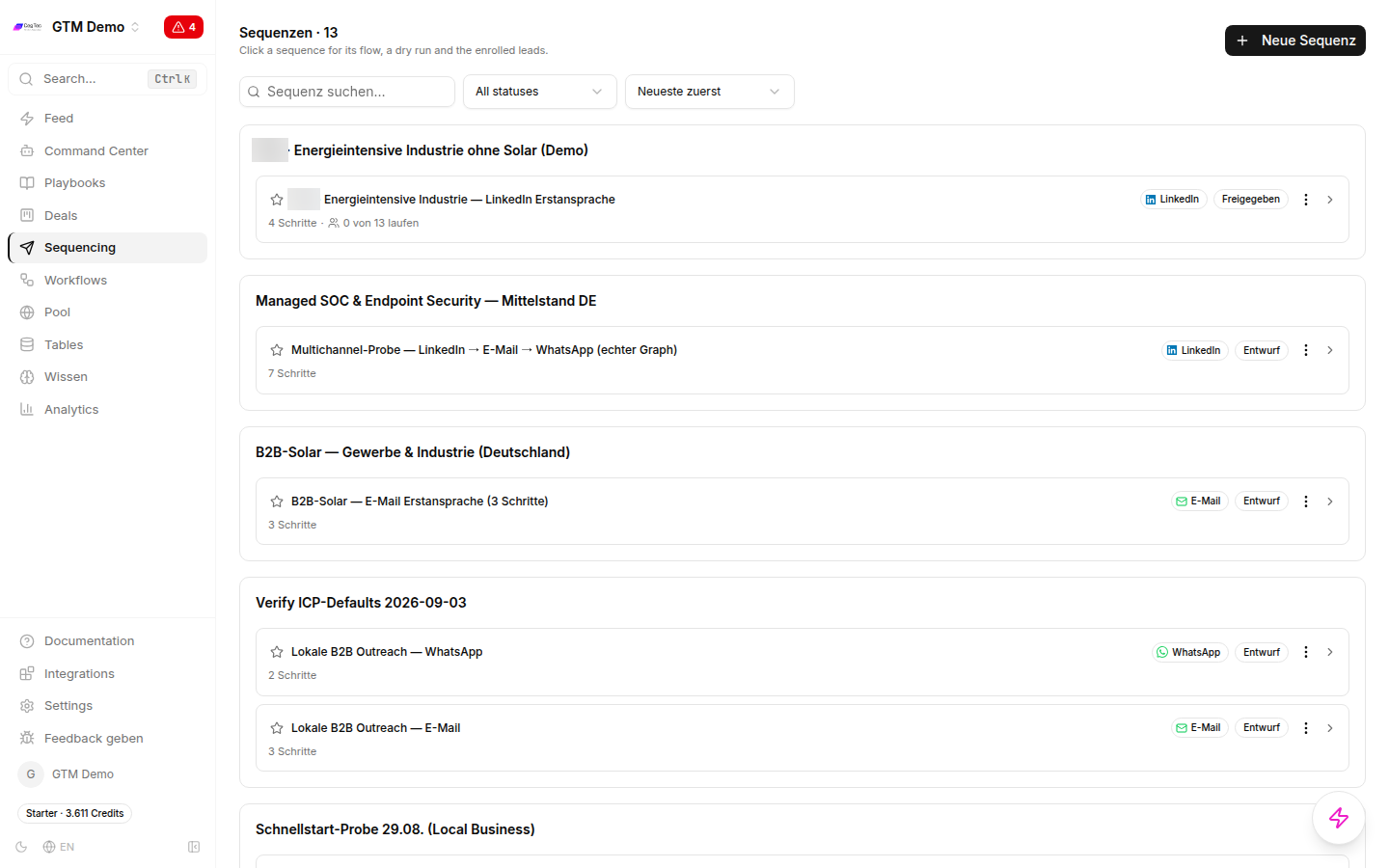
Sequences per playbook, with channel and number of steps.
The handover is again a column: an enroll column with a run condition that ensures only qualified rows are enrolled — in the example, “only if ICP fit is not empty”.
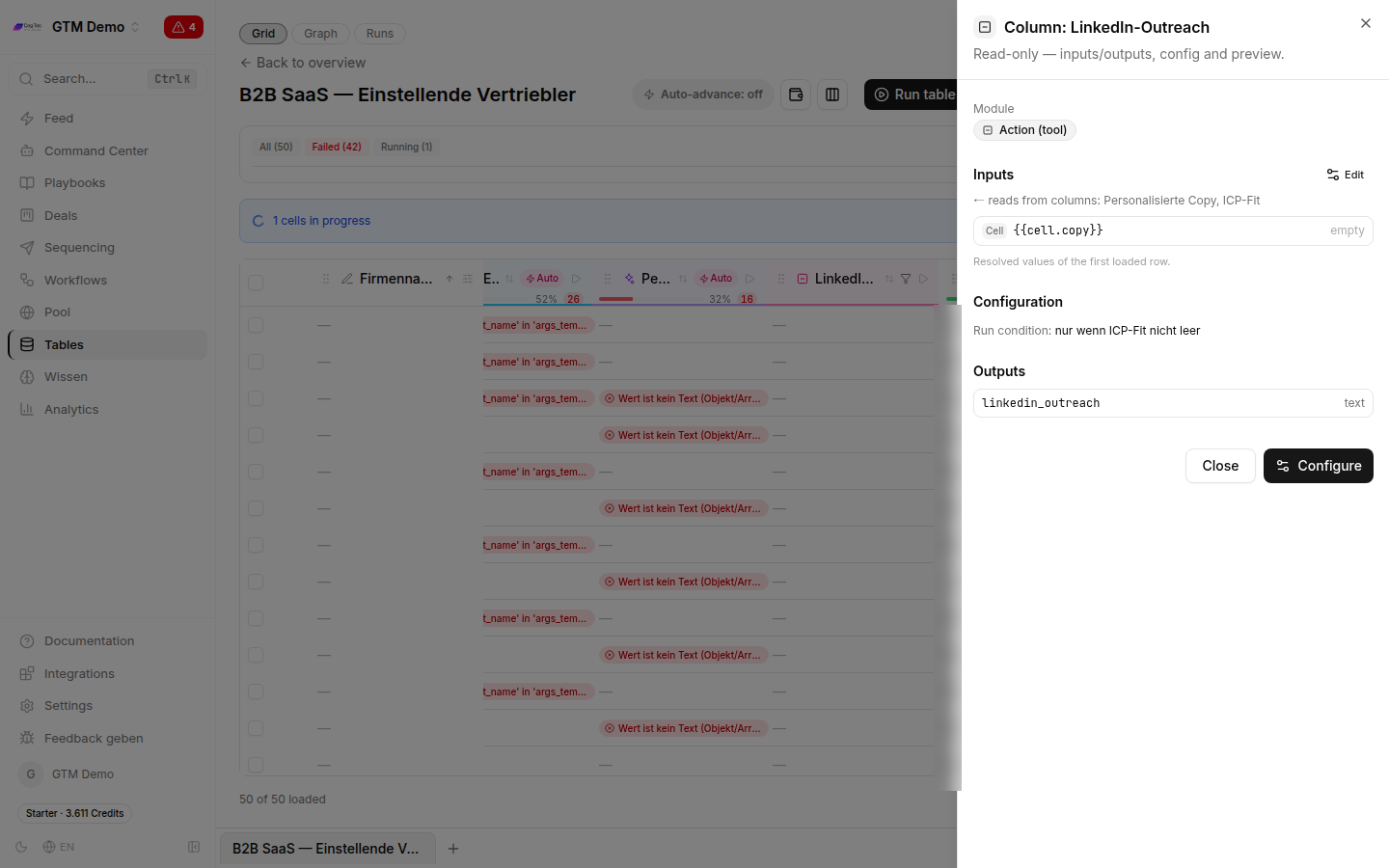
The run condition stops unqualified rows from entering a sequence.
What happens next you read off the analytics view: contacted, replies, reply rate and positive replies, broken down by channel.
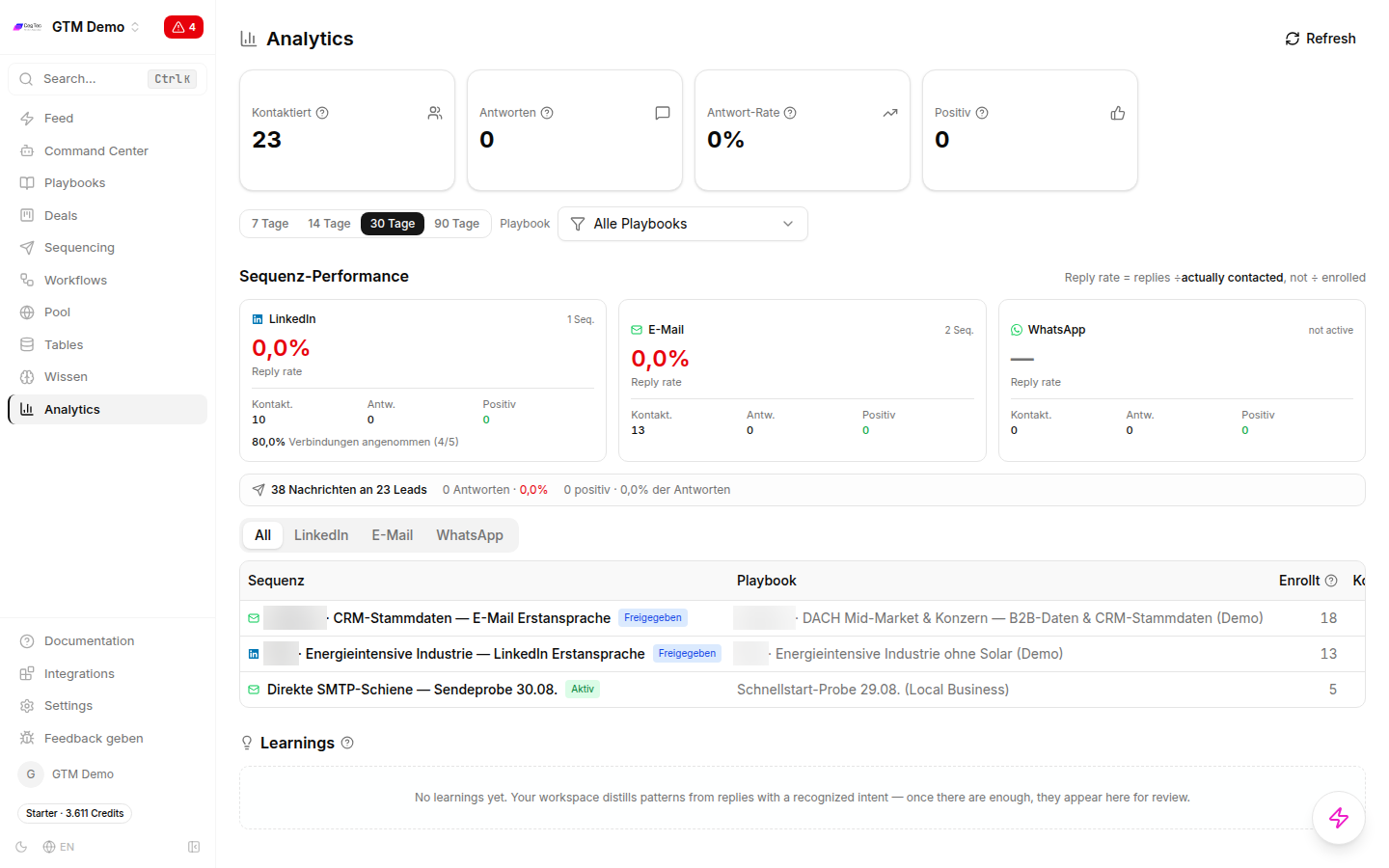
Analytics per channel — the feedback on whether the signal holds.
And this is where the actual leverage sits: ad and outreach reinforce each other. The same companies see your LinkedIn ad and shortly afterwards receive a message referring to the very event that put them on the list. The ad makes the name familiar, the message makes it concrete.
One practical note on sequencing: run the audience one to two weeks before the first outbound touch. The name should already feel familiar when the message arrives, not the other way round.
The short version
- An audience built on an event beats one built on filters — but only if you can filter it afterwards.
- You can only filter what is structured:
fit_score, not free text. - Run conditions are the cost brake: cheap check across all rows, expensive enrichment only on the survivors.
- Re-run failed cells before exporting — otherwise you export gaps.
- LinkedIn: 300 rows minimum, 300 matched members to run a campaign, up to 48 hours of generation time. At 300–3,000 rows, company targeting is usually the better choice.
- ChatGPT Ads: 25,000 matched users minimum, no pixel, no retargeting, Free and Go only. For a B2B signal list that means: work contextually, do not upload.
- The same qualified list is also your outbound list.
Related guides: Running ChatGPT Ads for the full ads setup, LinkedIn keyword monitoring for the signal side across the whole feed, engagers on your own posts for the warmest available signal, and the demand detection funnel for the model behind it.
Next step
GTM Goat runs exactly what you just read.